Update 20091104: Added “1 on 1 with notes landscape”, based on work of Edson Valle. Also added “2 on 1 with notes” and “3 on 1 with notes” layouts.
Update 20091108: Added “2 on 1 with notes landscape”, based on work of Edson Valle.
Update 20091202: Added “1 on 1 with notes”, based on work of Harald Welte.
For all my presentations I have been using LaTeX-Beamer package. One of the things I missed was the possibility of having handouts of my slides with some lines for notes besides the slides. After some searching I found that in the mailing lists of latex-beamer somebody had already come up with a solution.
If you put the file handoutWithNotes.sty either in your local texmf directory or in the same directory as your presentation you can include it with the following command
\usepackage{handoutWithNotes} |
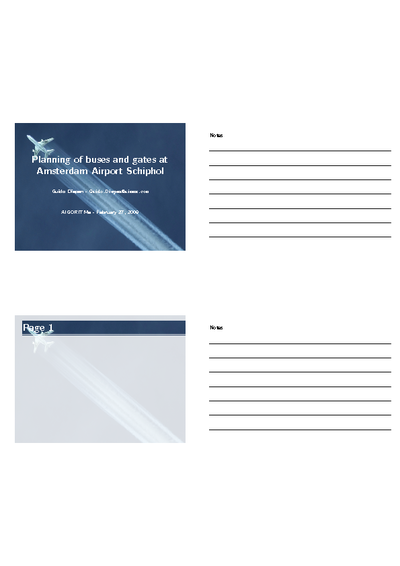
After that, to get 4 sheets on the left side of the page with on the right side of the page some lines for people to write notes you can use the following command
\pgfpagesuselayout{4 on 1 with notes}[a4paper,border shrink=5mm] |
The resulting PDF file will contain pages like:
Updated 20091104.I received a note from Edson Valle that he created an addition to the notes files, namely one that allows you to print your sheets 1 per page, but with notes on the side. Made a some small alteration to his original contribution to allow for easier usage.
I have updated the original download-link, so you only have to download the latest handoutWithNotes.sty file and you should be ready to use it.
Again, make sure that you include the style file with:
\usepackage{handoutWithNotes} |
after which you can now use the “1 on 1 landscape” layout with the following command:
\pgfpagesuselayout{1 on 1 with notes landscape}[a4paper,border shrink=5mm] |
.
The resulting files will look something like:
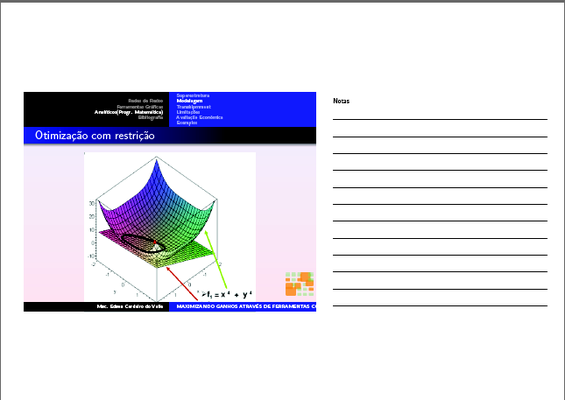
Showing the 1 on 1 with notes landscape
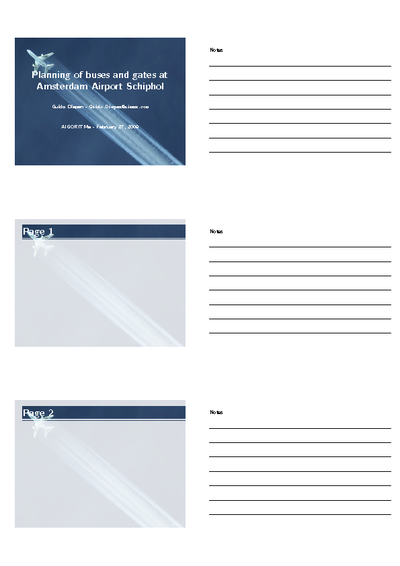
While I was at it, right away I also created two additional styles “2 on 1 with notes” and “3 on 1 with notes”. The first of these two was already requested once by kc853. Hopefully this new style will be sufficient for his needs. If not, I hope that it will serve as a good starter for modifications.
The “2 on 1 with notes” layout can be used with the command
\pgfpagesuselayout{2 on 1 with notes}[a4paper,border shrink=5mm] |
with the following result:

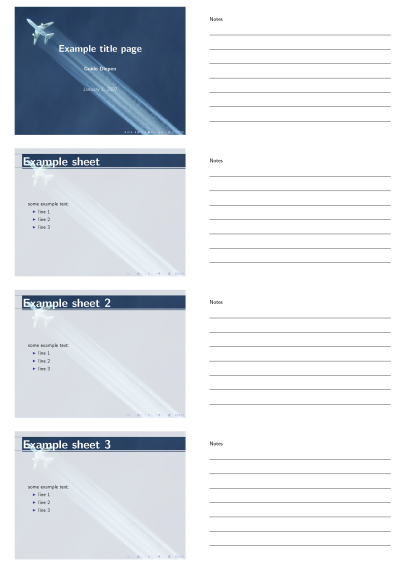
Finally, the “3 on 1 with notes” pages was created because I think that the “2 on 1 with notes” seemed a bit empty
You can use this “3 on 1 with notes” layout with the command
\pgfpagesuselayout{3 on 1 with notes}[a4paper,border shrink=5mm] |
with the following result:

Update 20091108 : Based on the above updated styles, Edson Valle provided me with another addition, the “2 on 1 with notes landscape” layout. You can use it with the command
\pgfpagesuselayout{2 on 1 with notes landscape}[a4paper,border shrink=5mm] |
and the output you will get will be something like:
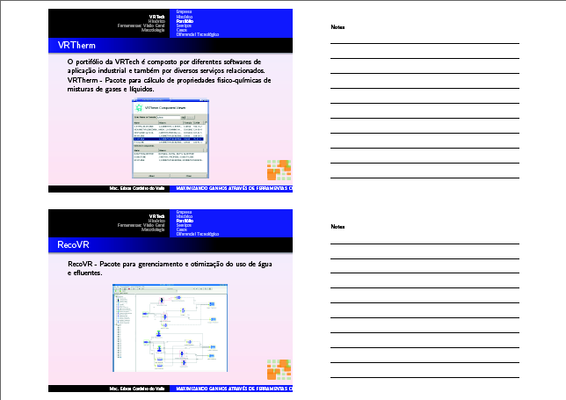
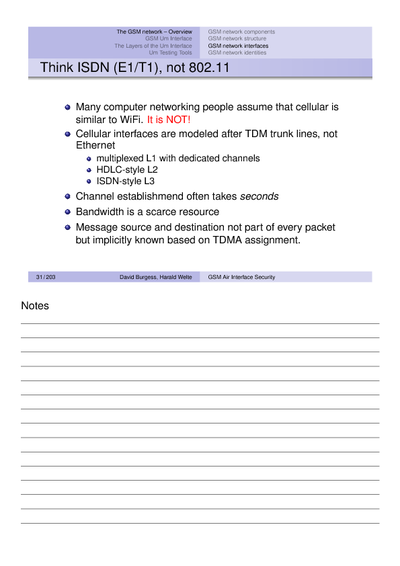
Update 20091202 : Based on the above updated styles, Harald Welte provided me with yet another addition, the “1 on 1 with notes” layout. You can use it with the command
\pgfpagesuselayout{1 on 1 with notes}[a4paper,border shrink=5mm] |
and the output you will get will be something like:
All of the above layouts can be used by downloading the handoutWithNotes.sty file.
Just drop me a note in case you like this or find it useful or in case you have any questions
Pingback: Beamer 2-up with projected frame above and notes below | Q&A System
Very nice job!!
By the way, it is possible to print my own notes instead of the lines?
If not, any directions?
very useful. thx
This is really excellent. Just changed my life and that of many of my students…
Absolutely great and useful.
really nice!
thx
Thank you very much for this great style file. One problem I am having is that for animated pages where the material is revealed one-by-one, it is generating a separate page (with notes below) for each of the animations rather than the final page. Any way to eliminate those extra pages?
Hi,
I am not 100% sure, but I think you could provide an option to latexbeamer that would put all separate overlays onto one page in case of printing. You would have to use that option in combination with the latex notes
Guido
Looks really nice, but does not work in my case. The paper size of the resulting pdf-file does not change to A4, but remains the default size used in documentclass{beamer}.
I am using “latex–>dvips–>ps2pdf” instead of “pdflatex” and this seems to be the problem. I tried a minimal example with “latex–>dvips–>ps2pdf” as well as “pdflatex” and got the correct result only with “pdflatex”.
Is there any workaround for that? I am using \psfrag and consequently I must apply “latex–>dvips–>ps2pdf”…
Cheers, Anton
Hi Guido,
I love your package, thank you very much! I used it many times in the past to get ready for my presentations.
Now I’m trying to use it to provide handouts to my students. However, I’m having a problem. Let’s suppose I use “\pgfpagesuselayout{3 on 1 with notes}.” Then, when I compile, I have the problem that the first slide in my presentation is shifted down at the end of the page, and slides 2 and 3, that would supposed to appear next on that page are missing (they are not missing, they are just out of the page), then the next page has slide number 4 shifted down to the end of the page, and so slides 5 and 6 are missing, and so on…
Does this problem ring a bell to you? I would certainly appreciate your suggestions.
Best,
Javier
Hi Anton,
not sure, I never used the way of latex->dvips->ps2pdf to create my slides: I always used pdflatex directly. Would have to investigate this to see whether it can be changed, don’t know right now.
Guido
Hi Javier,
happy to hear you love the package! Have not done some work on this for some time, so do not directly know the answer. Will also first be enjoying some vacation time. After my vacation, will try to take a deeper look into this question. If in the meantime you do find your answer, would really appreciate it if you share it here
Guido
Hi Guido,
I guess the problem with the slides being shifted down is with MikTeX 2.9. I was working on my slides in a newer computer and that was always the problem. Later I did it in my older computer where I have MikTeX 2.7 and works beautifully. I guess it also works on MikTeX 2.8, since I tried that in another computer.
Best,
Javier
Hi Guido,
Just wanted to add my thanks and appreciation for the work you have done on this.
Without it I would have had a lot of trouble getting this sorted,
Cheers,
J.
It’s very useful. Thank you very much!
Hy Guido,
I used to use [handout] and [handout-better] to print my presentations. I’m grateful for your work, because now I have the choice to write my notes. So I can better manage my presentations. Congratulations.
Patrick
Hi, first off, thank you very much for this great package!
Second, in my university we have a rather white presentation template, so I would like to ask if you know some easy way to get a black or grey border around each slide?
Cheers,
Lars
Thanks a lot. You just saved me some time, because I was thinking about trying to achieve something similar.
Excellent job. Thanks!
Thank you, it worked well
This post is really helpful. Thank you very much.
That’s really helpful!
Is there any way to view the notes in the output PDF file, but not when the file is opened in presentation mode? Something similar to MS Powerpoint?
Thanks!
Hello Guido,
thx for this nice package.
Feature Request:
It would be nice, if the “Notes” text would be a variable, to support other languages. In DE i wan’t to call it “Notizen”.
Bye
Hello Guido,
Thanks a lot for this nice package!
Lino
Guido, great, it just did the job ! Thanks.
In response to Tameron: Combination of handoutsWithNotes beamer WITHOUT the option ‘handout’ did create separated slides per frame. But WITH the ‘handout’ option in beamer the slides of each frame were merged.
Thanks!
This package is great, is usefull to me, I´am preparing a presentation, and with this format my teacher can see and correct the mistakes that I could have…
Hi,
Thank you for this post about adding notes with Beamer, was really looking for it.
I want to know if there is any possibility to directly write notes with my slides: I mean, rather than adding empty lines as presented in the images attached, I want to add text.
Is this posible ?
Hi Kaiser,
in this version that is not possible (unless you start modifying the sty files yourself). The way it currently works is creating one ‘template page’ for the notes and just copy this every time.
Having dynamic notes per page will be quite a bit more tricky… If I ever have more time again, will take a look into this though!
Guido