When I was a PhD student I had to give some presentations. I think I tried once to use Powerpoint to give a presentation filled with mathematical equations before I decided that this was not going to work
After some other packages, I finally found LaTeX-Beamer. For the majority of the presentations the default styles provided with LaTeX-Beamer were sufficient, but every now and then I wanted to have a bit more, do I dare to say it, powerpoint like theme
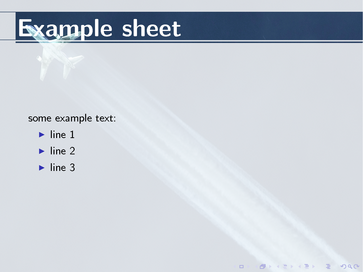
I wanted to have background image over which an white transparent layer would be put, on which the text would appear. I created a latex-beamer style for this and a sample output of this diepen style is given in the two pictures below:
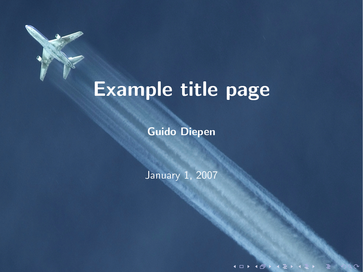
Screenshot showing example title page of diepen style

Screenshot of normal sheet in diepen style
The picture that is on the background can be changed into any picture you choose, although I found that in most cases the result is the best when the used image is not too bright.
To use the style, you must first download the source, unpack it to a directory of your choice in the texmf directory (or your local texmf directory) and make sure that you have run the texhash command under linux or the windows equivalent such that pdflatex is able to find the style files.
After you have done this, you can use it by placing the following command in the preamble of your beamer file:
1 | \usetheme{diepen} |
The following options are available:
- backgroundimagefile. The filename (without extension) of the image to use as background (e.g.
1
\usetheme[backgroundimagefile=schiphol-tower]{diepen}
to use schiphol-tower image as background)
- opacity. A float value denoting the opacity of the white overlay on all sheets except the title page (e.g.
1
\usetheme[opacity=0.78]{diepen}
to have opacity of 78%).
- useblacktitletext. Is a boolean and if present the color of the text on the titlepage will be black instead of white
1
\usetheme[useblacktitletext]{diepen}
. This option sometimes is useful for background images that are rather light in color
If you have any questions about this diepen style, please let me know.
Hey,
I liked this style and i have started using it for a workshop i am conducting. I use PStricks to include graphics in my presentations. To compile PStricks i cannot compile directly using pdflatex. While the theme was working fine when i use Pdflatex. It is not when i am using just Latex to compile the same. Can you help with this problem
Great to hear that people like the style
Regarding your problem, unfortunately I don’t have too much experience with using my theme via latex instead of pdflatex. What exactly is going wrong when you using latex? Does everything work if you use another style than my latexbeamer style diepen?
Guido Diepen
Yes other themes work. I think i figured out what the problem is, i have not solved it. When i use Latex , PGP is not able to find the Background picture even though it is in the texmf folder. It does when i place the picture in the working folder and make sure the format is *.eps
I am new to Latex and i do not know how to fix this
Ah, forgot about that indeed
The thing is that latex is not able to read the ‘normal’ picture formats (as jpg, png, etc), while pdflatex is. In case you would like to use latex, you must ensure that you have the pictures in a format that latex understands (i.e. eps). Under Unix, when you have ImageMagick installed, you can easily convert the original picture with the convert command:
convert picture.jpg picture.eps
I am not sure if there is another way to actually have latex read the original pictures. In order for it to work regardless of what you are using (pdflatex or latex), I would suggest creating an eps of the picture in the same directory as the original picture. When you do not use the extension in the file to be used, latex (and pdflatex) will use the type of image that they know how to handle.
Hope this helps you.
Kind regards,
Guido Diepen
Any idea what the windows equivalent of texhash is?
Hello,
I’m a Ph.D. student in the French National Institute of Transport Research and Safety. I found this Beamer them crossing this site http://mcclinews.free.fr/latex/introbeamer.php
I would like to thank a lot the authors and to give them my congratulations. I’m a user of Latex since I was in Ingineering school and I like it much because it make easier dealing with mathematical equations. However, when you want to speak to less creazy poeple than mathematicians, you need to put at least some colors to be atractive… So this them is a very good idea to make this.
@Nathan : texhash equivalent for windows is
MikeTex options (accessible from accesories menu of your tex editor) > Refresh FNDB
Best regards,
Mohamed
Hello, where can I get source file of diepen theme? Please help. Presently I complied in windows MikTex but there is error saying diepen.sty not found. My pdflatex works for other normal themes e.g. Dresden.
Hi sopan,
A link to the source can be found in the article. I understand it might be a bit difficult to see, will try to add a more clear link in the article later.
The link to the source is: http://www.guidodiepen.nl/wp-content/uploads/2009/04/beamerthemediepen-20070108.tar.gz
To the author(s),
This theme is a good weapon to combat the so called powerpoint followers.
I am a student at Indian Institute of Technology Bombay, and a part of the “Beamer Awareness” group of our Department. Your theme has really helped the case of informal presentations using beamer.
Thank you very much.
Tej Vohra
Wow…
This is a good theme, pretty simple to make presentations with a unique look on an easy way.
Thank you very much for publishing it.
Matheus de Oliveira
Hey thanks for this theme, I got it and its working fine, m using it for my presentations now.:)
Pingback: Latex Beamer Themes | Chengchun Hao's Homepage
I can not install the package…
what should I do now? what default program should I use?
Nice theme!!! I’ll use it, the option to configure the background image is wonderful
thanks
Hello. Can a simple piece of code do this for the background of a single slide, in any theme? That is, I want to include an image as background but have it semitransparent / ie mixed with white. I wonder whether your insights from making this theme would make that an easy task.
Thanks for sharing your work!
Hi Chris,
should not be very difficult. You can just check the source of the tex files to see what I do for this. Basically, I just use some pgf stuff to draw the picture and draw a white layer over this.
Guido Diepen
This is a really good yet simple theme.
Hello
I would like to thank a lot. This theme is very nice and interest. I always use of Latex and beamer, so I always research and find new theme! Now, I find your theme. Really, It`s very wonderful, I`m really thankhful.
Best regards
Thanks,For the package is actually wonderful.But I could not install it,because I don’t know the equivalent command of texhash command in Window Operating system.